Adding the UpdatePresenter actually led to a decent refactoring. After adding UpdatePresenter I realized that I needed the ability to push changes in the UserData instance to the ReadView.
This meant changing the ViewFactory to a PresenterFactory. This change was required because the Presenter handles pushing changes to the view. Therefore, I needed to maintain a reference to the presenter and call
Push before displaying a view. The refactored ViewFactory becomes this PresenterFactory.public class PresenterFactory
{
public Hashtable presenterHash = new Hashtable();
public PresenterFactory(IPresenter[] presenters)
{
for (int i = 0; i < presenters.Length; i++)
{
this.presenterHash[presenters[i].View.GetType()] = presenters[i];
}
}
public IView Find(Type type)
{
IPresenter presenter = (IPresenter) presenterHash[type];
presenter.Push();
return presenter.View;
}
}
This lead to changing the EntryPoint to add IPresenters to the PresenterFactory.
public class EntryPoint
{
 [STAThread]
 static void Main()
 {
  MainForm mainForm = new MainForm();
  UserData userData = createUser();
  new MainPresenter(mainForm, createPresenterFactory(userData));
  Application.Run(mainForm);
 }

 private static UserData createUser()
 {
  UserData user = new UserData();
  user.Name = "John Doe";
  user.JobTitle = "Rockstar";
  user.PhoneNumber = "212-555-1212";
  return user;
 }

 private static PresenterFactory createPresenterFactory(UserData user)
 {
  return new PresenterFactory(getPresenters(user));
 }

 private static IPresenter[] getPresenters(UserData user)
 {
  return new IPresenter[] { getReadPresenter(user), getUpdatePresenter(user) };
 }

 private static IPresenter getReadPresenter(UserData user)
 {
  ReadView view = new ReadView();
  return new ReadPresenter(view, user);
 }

 private static IPresenter getUpdatePresenter(UserData user)
 {
  UpdateView view = new UpdateView();
  return new UpdatePresenter(view, user);
 }
}
The IPresenter interface is used to get access to the View and to Push the model changes to the View before it is displayed.
public interface IPresenter
{
 IView View { get; }
 void Push();
}
After these changes you can add the UpdatePresenter.
public class UpdatePresenter : IPresenter
{
 ...

 private void saveButton_Click(object sender, System.EventArgs e)
 {
  Save();
  Navigate(typeof(ReadView));
 }
}
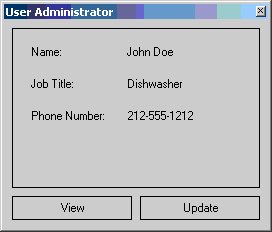
The end result is an update view that saves changes....

when you click "Save."


No comments:
Post a Comment
Note: Only a member of this blog may post a comment.