Sunday, September 30, 2007
Speaking: QCon San Francisco
I'm going to be presenting on Business Natural Languages (Domain Specific Languages for Subject Matter Experts) at QCon San Francisco in November.


Are Screencasts the Future?
Before I joined ThoughtWorks I worked for Nelnet. Nelnet is a student loan products and services organization. While employed at Nelnet (around Sept 2004), I was sent to an education conference where one of the keynote speakers presented data showing that students who were born after 1981 learn differently than those born prior. The reason this data was important was because it demonstrated that students born after 1981 were far more effective at learning through watching, listening, and doing. The speakers conclusion was that the educational system needed to react by creating classes which didn't rely so heavily on simply reading a textbook. At the time I thought the information was interesting, but not particularly relevant to me.
Today, some of the more popular educational materials can be found in audio (podcasts) or audiovisual (screencasts) form. Additionally, sites like Try Ruby encourage you to give kinesthetic learning a try. After seeing the growth in each of these areas over the past few years, I think it's fair to say that the conference speaker was on to something.
I sent a draft of this entry to Geoffrey Grosenbach for review. He sent back a few more reasons why he believes in screencasts as good teaching tools.
Today, some of the more popular educational materials can be found in audio (podcasts) or audiovisual (screencasts) form. Additionally, sites like Try Ruby encourage you to give kinesthetic learning a try. After seeing the growth in each of these areas over the past few years, I think it's fair to say that the conference speaker was on to something.
I sent a draft of this entry to Geoffrey Grosenbach for review. He sent back a few more reasons why he believes in screencasts as good teaching tools.
Here's a few links for those intersted in trying out some alternative learning tools.
- Efficiency of time: It takes dozens of hours to read a 300 page book straight through. But a screencast can pack the most relevant information into an hour.
- Passive/Active: You can sit back and pick up whatever elements are interesting to you. Some people say the most valuable part is learning auxiliary shell shortcuts or workflow tips.
- Graphical/Textual: I don't know any tech publisher who pays an artist to draw helpful diagrams. Screencasts are inherently graphical and it makes sense to include a few diagrams that explain the topic better than paragraphs of text would.
Saturday, September 29, 2007
Learning Rails is Easy, Mastering Rails is Hard
There's plenty of hype and momentum around Ruby on Rails. The screencasts give quick demos of how easy it is to craft a solution using Ruby on Rails. There's even a humorous picture implying how simple it is to learn and use Rails to build web applications.
The screencasts and pictures don't lie. It is easy to learn Rails and quickly become productive. However, the dirty little secret is that it's very hard to be come an expert at utilizing Rails.
Anatomy of a Rails Web 2.0 Application
Rails provides many helpers that make your life easy. But, you can't entirely hide the fact that you'll need to be proficient with Ruby, JavaScript, YAML, and SQL. Just like Rails, getting started with any of the above languages is easy, it's mastering them that takes time and effort.
Becoming an expert with each of the above languages involves gaining knowledge and becoming proficient with several aspects of the language.
Development Environment
There's no IDE that can provide all the features you'd like for Ruby, JavaScript, YAML, and SQL. Some are (hopefully) on the way, but they still suffer from speed, feature, and stability issues. That generally means is you'll have two options:
Language Features
Look for documentation and try out the examples for each language you are looking to master. Ruby has decent documentation on http://www.ruby-doc.org/. YAML documentation can be found on http://www.yaml.org/. JavaScript and SQL have seemingly endless documentation resources. I've always been a fan of the O'Reilly books, so I'd recommend Safari Books Online, but there's plenty of other options if you'd like.
But, don't stop with reading. Reading documentation and trying examples isn't going to bring you to the expert level. Another great way to get some insight into a language is to look at the successful frameworks and see how they are implemented. Browsing the Rails codebase should provide examples of almost every feature available in Ruby. Likewise, understanding the Prototype and Script.aculo.us libraries should greatly improve your JavaScript skills.
Testing
Testing is valuable in any language. Ruby provides a few different testing solutions, but the most popular are still Test::Unit and RSpec. JavaScript also provides several options for testing. I can't say there's a clear winner, but JsUnit and Crosscheck seem to be gaining momentum. As far as testing SQL and YAML, I generally functionally test them through Ruby. Additionally, Selenium is a great resource for acceptance testing Rails applications.
Frameworks
Both Ruby and JavaScript provide a plethora of framework options. Ruby provides RubyGems for distributing shared Ruby code. RubyGems are frameworks that can provide all kinds of building blocks for creating applications. In the past I've used the Prototype and Scriptaculous JavaScript libraries, but my current team is enjoying using JQuery.
Debugging
Debugging Ruby is a bit primitive these days. The simplest form of debugging is printing to standard out. You can roll your own simple debugging solution also. Additionally, ruby-debug looks promising. None of the solutions are great, so it's good to have all 3 tools at your disposal. For JavaScript debugging I suggest getting proficient with FireBug. SQL debugging solutions are generally vendor specific, check the docs of the database that you choose for a good suggestion. YAML doesn't generally require a debugger since most errors simply result in parsing problems.
What else makes Rails difficult to master?
Mastering languages is important, but it's not enough to run a high traffic Rails application. You'll still need to understand performance optimization and deployment strategies. There's an abundance of Rails production heuristics available, but little of it is well documented. I'd suggest reading the following blogs: Brainspl.at, Err the Blog, and RailsExpress. Beyond those blogs the web provides several other resources. A Google search should provide more than enough reference material.
That's a ton to learn
It's true, that is a lot of information to digest. But, experts aren't made overnight. The good news is, you can get started very easily and expand your knowledge as needed. There is a large amount of information available, but don't feel overwhelmed: The majority of the information is very straightforward. Becoming an expert with Rails takes time more than anything else.
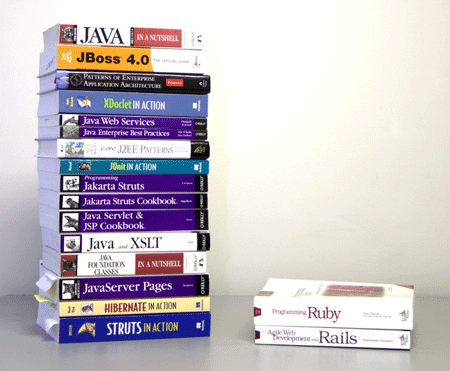
The screencasts and pictures don't lie. It is easy to learn Rails and quickly become productive. However, the dirty little secret is that it's very hard to be come an expert at utilizing Rails.
Anatomy of a Rails Web 2.0 Application
Rails provides many helpers that make your life easy. But, you can't entirely hide the fact that you'll need to be proficient with Ruby, JavaScript, YAML, and SQL. Just like Rails, getting started with any of the above languages is easy, it's mastering them that takes time and effort.
Becoming an expert with each of the above languages involves gaining knowledge and becoming proficient with several aspects of the language.
Development Environment
There's no IDE that can provide all the features you'd like for Ruby, JavaScript, YAML, and SQL. Some are (hopefully) on the way, but they still suffer from speed, feature, and stability issues. That generally means is you'll have two options:
- Find a productive development environment that specializes in one or two of them and use a different IDE/Text Editor for each language
- Find an editor that provides decent support for all of them.
Language Features
Look for documentation and try out the examples for each language you are looking to master. Ruby has decent documentation on http://www.ruby-doc.org/. YAML documentation can be found on http://www.yaml.org/. JavaScript and SQL have seemingly endless documentation resources. I've always been a fan of the O'Reilly books, so I'd recommend Safari Books Online, but there's plenty of other options if you'd like.
But, don't stop with reading. Reading documentation and trying examples isn't going to bring you to the expert level. Another great way to get some insight into a language is to look at the successful frameworks and see how they are implemented. Browsing the Rails codebase should provide examples of almost every feature available in Ruby. Likewise, understanding the Prototype and Script.aculo.us libraries should greatly improve your JavaScript skills.
Testing
Testing is valuable in any language. Ruby provides a few different testing solutions, but the most popular are still Test::Unit and RSpec. JavaScript also provides several options for testing. I can't say there's a clear winner, but JsUnit and Crosscheck seem to be gaining momentum. As far as testing SQL and YAML, I generally functionally test them through Ruby. Additionally, Selenium is a great resource for acceptance testing Rails applications.
Frameworks
Both Ruby and JavaScript provide a plethora of framework options. Ruby provides RubyGems for distributing shared Ruby code. RubyGems are frameworks that can provide all kinds of building blocks for creating applications. In the past I've used the Prototype and Scriptaculous JavaScript libraries, but my current team is enjoying using JQuery.
Debugging
Debugging Ruby is a bit primitive these days. The simplest form of debugging is printing to standard out. You can roll your own simple debugging solution also. Additionally, ruby-debug looks promising. None of the solutions are great, so it's good to have all 3 tools at your disposal. For JavaScript debugging I suggest getting proficient with FireBug. SQL debugging solutions are generally vendor specific, check the docs of the database that you choose for a good suggestion. YAML doesn't generally require a debugger since most errors simply result in parsing problems.
What else makes Rails difficult to master?
Mastering languages is important, but it's not enough to run a high traffic Rails application. You'll still need to understand performance optimization and deployment strategies. There's an abundance of Rails production heuristics available, but little of it is well documented. I'd suggest reading the following blogs: Brainspl.at, Err the Blog, and RailsExpress. Beyond those blogs the web provides several other resources. A Google search should provide more than enough reference material.
That's a ton to learn
It's true, that is a lot of information to digest. But, experts aren't made overnight. The good news is, you can get started very easily and expand your knowledge as needed. There is a large amount of information available, but don't feel overwhelmed: The majority of the information is very straightforward. Becoming an expert with Rails takes time more than anything else.
Friday, September 28, 2007
Ruby: Trivial Debugger Implementation
A common question you receive as a Ruby developer is: Don't you miss robust debugging support? The short answer is No, but that's not entirely true. The reality is that Ruby developers are generally willing to make trade-offs in order to work with a language that they find more pleasing.
Do I wish I had a great IDE with fantastic debugging support? Of course I do, and I'd also like refactoring support while we are daydreaming. Until that day comes, I'll continue to look for other ways to be effective.
To mitigate the debugging issue the Ruby developers I work with end up relying very heavily on their tests; therefore, debugging becomes less of an issue. Unfortunately, even the best testers can't always isolate complicated issues. In these circumstances the best Ruby developers are often forced to use the age old debugging strategy of printing values. I was recently in one of these situations and I used the following statement in lieu of the typical
I do miss mature tools and infrastructure. However, the ease in which I can create adequate solutions in Ruby makes it hard to consider doing anything else, currently.
Do I wish I had a great IDE with fantastic debugging support? Of course I do, and I'd also like refactoring support while we are daydreaming. Until that day comes, I'll continue to look for other ways to be effective.
To mitigate the debugging issue the Ruby developers I work with end up relying very heavily on their tests; therefore, debugging becomes less of an issue. Unfortunately, even the best testers can't always isolate complicated issues. In these circumstances the best Ruby developers are often forced to use the age old debugging strategy of printing values. I was recently in one of these situations and I used the following statement in lieu of the typical
p statement.loop do
p eval(gets)
endI do miss mature tools and infrastructure. However, the ease in which I can create adequate solutions in Ruby makes it hard to consider doing anything else, currently.
Monday, September 24, 2007
Semi-bluffing your interview
Over the past two and a half years I've interviewed several ThoughtWorks candidates. These days I tend to put people into 3 categories when interviewing them: Gross Exaggerator, WYSIWYG, and the Semi-bluffer.
The Gross Exaggerator
Being a Gross exaggerator is never a good idea. Your resume is the first clue. I've yet to meet anyone who's an expert* with .net, Java, Ruby, Smalltalk, and Lisp. There's just not enough hours in the day to actually be an expert in each language. Anyone with several buzzwords on their resume signals two things to me: They likely have no idea what they don't know, and they aren't picky enough about technologies they are willing to work with.
I took C in college also, but one semester of Data Structures does not an expert make. I did Java at my first job, but I have no desire to program in it now, so what's the point of listing it as one of my skills? I'm not saying that my resume doesn't contain the word Java. In fact, it does state in my first job description that we used Java, but my skills list is not a summary of what I've done in my past. My skills list is the list of skills that I've kept up with and am interested in continuing to keep up with. A bloated skills list indicates that you think you know more than you do, or you haven't spent the time to be and expert in anything; both situations look bad.
Being a Gross Exaggerator in an interview is painful. You generally have a bit of knowledge of several things, but almost no in depth knowledge of anything. Most questions quickly expose this. Gross Exaggerators are fairly easy to spot, and I always pass on hiring them.
WYSIWYG (What You See Is What You Get)
It's very easy to be a WYSIWYG candidate, because you are very clear about what you know and what you don't. A WYSIWYG candidate never gives a partial explanation; they either tell you every painful detail, or claim to know little or nothing about the topic.
Hiring a WYSIWYG is an easy choice, but I don't think being a WYSIWYG is the best option. The problem with being a WYSIWYG is that there are several Gross Exaggerators and some Semi-bluffers that will be competing with you. Someone who claims to have the knowledge you do, plus more, will always be an attractive choice for a potential employer.
The Semi-bluffer
I think Semi-bluffing interviewees generally do the best because they demonstrate what they know, suggest that they know more, but admit what they don't know when directly challenged. In fact, I believe the above quote could be rewritten as the following to describe Semi-bluffing in an interview.
Try Semi-bluffing a question in your next interview. It can be a great rush, but be sure to admit when you don't know something. Also be careful about choosing which question to Semi-bluff. A direct and detailed question isn't a good candidate for a Semi-bluff. When someone knows they have "the nuts" a bluff is an (often embarrassing) waste.
* I define expert as someone who is knowledgeable concerning: syntax, development environment, advanced language features, how and what to test, framework choices, details of several frameworks of the language, debugging, performance optimization, deployment strategies, and pattern implementation specific to the language.
The Gross Exaggerator
Being a Gross exaggerator is never a good idea. Your resume is the first clue. I've yet to meet anyone who's an expert* with .net, Java, Ruby, Smalltalk, and Lisp. There's just not enough hours in the day to actually be an expert in each language. Anyone with several buzzwords on their resume signals two things to me: They likely have no idea what they don't know, and they aren't picky enough about technologies they are willing to work with.
I took C in college also, but one semester of Data Structures does not an expert make. I did Java at my first job, but I have no desire to program in it now, so what's the point of listing it as one of my skills? I'm not saying that my resume doesn't contain the word Java. In fact, it does state in my first job description that we used Java, but my skills list is not a summary of what I've done in my past. My skills list is the list of skills that I've kept up with and am interested in continuing to keep up with. A bloated skills list indicates that you think you know more than you do, or you haven't spent the time to be and expert in anything; both situations look bad.
Being a Gross Exaggerator in an interview is painful. You generally have a bit of knowledge of several things, but almost no in depth knowledge of anything. Most questions quickly expose this. Gross Exaggerators are fairly easy to spot, and I always pass on hiring them.
WYSIWYG (What You See Is What You Get)
It's very easy to be a WYSIWYG candidate, because you are very clear about what you know and what you don't. A WYSIWYG candidate never gives a partial explanation; they either tell you every painful detail, or claim to know little or nothing about the topic.
Hiring a WYSIWYG is an easy choice, but I don't think being a WYSIWYG is the best option. The problem with being a WYSIWYG is that there are several Gross Exaggerators and some Semi-bluffers that will be competing with you. Someone who claims to have the knowledge you do, plus more, will always be an attractive choice for a potential employer.
The Semi-bluffer
In [poker] games with multiple betting rounds, to bluff on one round with an inferior or drawing hand that might improve in a later round is called a semi-bluff. A player making a semi-bluff can win the pot two different ways: by all opponents folding immediately or by catching a card to improve the player's hand. --WikipediaSemi-bluff is a term that I picked up playing poker. A few of the things I love about poker is that you don't know what the competition has, you don't know what will be needed in the end to win, and you probably don't know if you are currently winning or losing. Of course, each of those things can be said about almost any interview.
I think Semi-bluffing interviewees generally do the best because they demonstrate what they know, suggest that they know more, but admit what they don't know when directly challenged. In fact, I believe the above quote could be rewritten as the following to describe Semi-bluffing in an interview.
Almost all interviews involve a series of questions, to give a vague answer to one question when you don't know enough details can be called a semi-bluff. An interviewee making a semi-bluff can pass that round of questioning two different ways: if the interviewer doesn't request more information or if the follow up question happens to hit one aspect where you do understand the details. A semi-bluff can also be a success if the interviewee admits to not knowing the answer at the moment, but later in the interview process demonstrates that the desired knowledge has been acquired.A Semi-bluff in poker, and while interviewing, takes a great deal of finesse. Coming off as a WYSIWYG while Semi-bluffing is safe, but coming off as a Gross Exaggerator can cost you a job. Therefore, it's obvious which way you should lean if you find Semi-bluffing isn't working out for you.
An example of a Semi-bluff could be demonstrated as the following.
Interviewer: Do you have experience with deploying Rails applications.
Interviewee: On my current project we use Capistrano and deploy to RHEL. The Webserver is Nginx fronting a Mongrel cluster.
Notice that the interviewee hasn't stated that he did any of that work, instead he's simply listed his current project's deployment plan. The questions may end right there, but if they don't you can easily follow up with: Truthfully, I've been focused on other parts of the application so I only have a high level view of our deployment. However, I believe that it would be very easy for me to get into the details of your specific deployment if I am hired. Following the interview, the interviewee should then dig into the details of their current deployment and send answers via email to the interviewer. Obviously, the faster the email is sent, the better.
Try Semi-bluffing a question in your next interview. It can be a great rush, but be sure to admit when you don't know something. Also be careful about choosing which question to Semi-bluff. A direct and detailed question isn't a good candidate for a Semi-bluff. When someone knows they have "the nuts" a bluff is an (often embarrassing) waste.
* I define expert as someone who is knowledgeable concerning: syntax, development environment, advanced language features, how and what to test, framework choices, details of several frameworks of the language, debugging, performance optimization, deployment strategies, and pattern implementation specific to the language.
Subscribe to:
Posts (Atom)